A supermarket owner once discovered a large stock variance at year-end. Three months of investigation pointed to a combination of cashier discounts given without approval, products sold without being scanned, and a manual stock count that hadn't been updated since August. The owner had no system — or rather, had a system that didn't talk to the register.
That story is not unusual. Most retail losses happen quietly, transaction by transaction, in the gap between what the POS records and what the accountant sees at month-end. The right retail management software closes that gap in real time.

What retail management software actually needs to do
A retail POS system that only processes sales is half a system. The other half — stock synchronization, cashier accountability, payment reconciliation, and management reporting — is where most shops fall down.
Here is what a complete retail management setup needs to handle:
- Sales processed at speed — scanning products, applying discounts and accepting multiple payment methods without slowing the queue
- Stock that updates with every sale, purchase and return — not at the end of the day
- Cashier-level controls so discounts and voids require authorization
- Card and mobile money payments that reconcile automatically without manual journals
- End-of-day closing that a manager can review in five minutes, not five hours
- Reports by product, category, cashier and time period that actually help you buy better
How Vendra handles retail operations
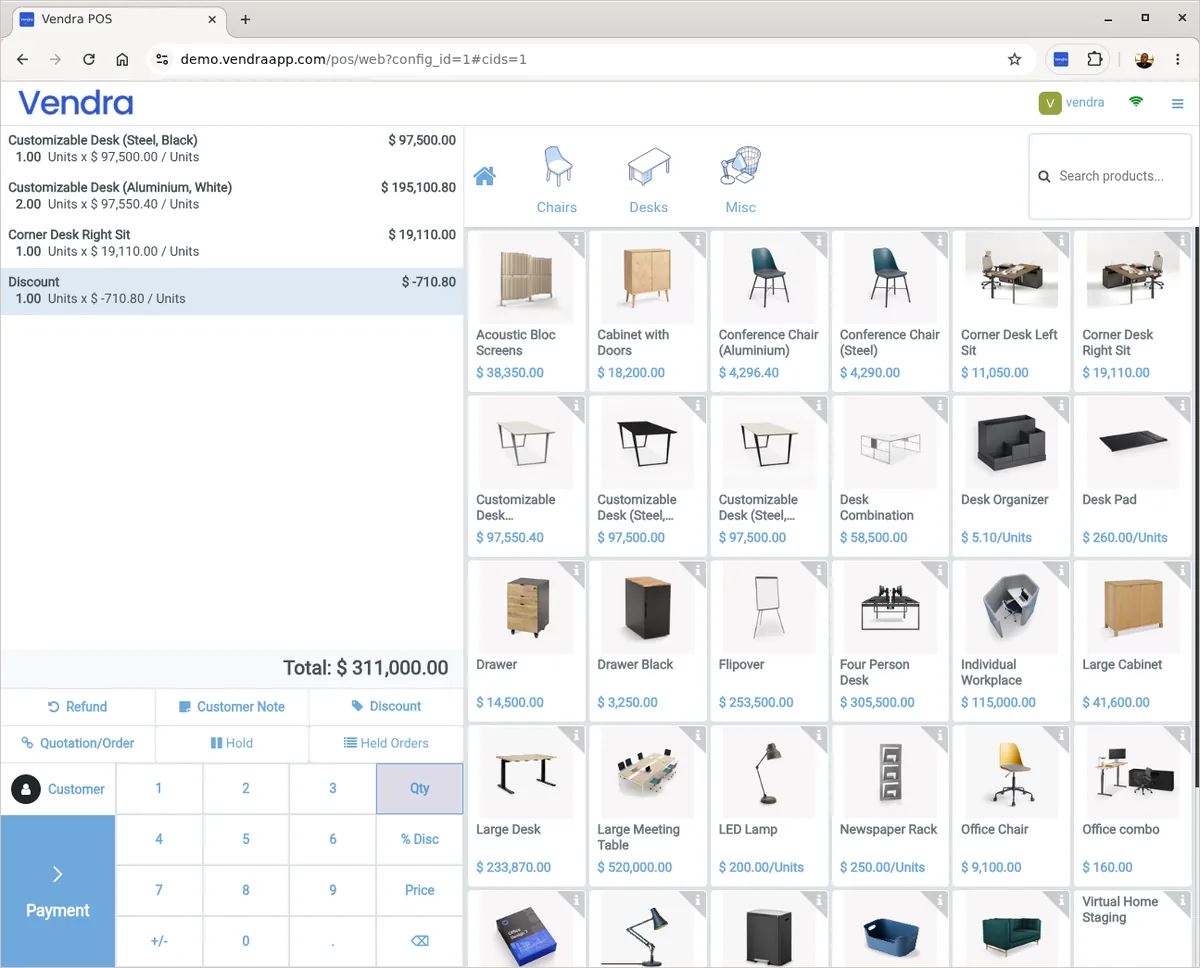
Vendra's POS was built for real-world retail conditions — variable internet, multiple payment methods, and the reality that most shop owners are not in the building for every transaction.
Point of sale and checkout
Products are searched by name, category or barcode. The POS supports USB and Bluetooth barcode scanners — standard for any supermarket setup. Receipts print immediately via a thermal printer or can be sent digitally. Cashiers work within their permissions; they cannot override prices or close the session without manager-level access.
Vendra's POS operates offline. If your connection drops mid-day, sales continue without interruption. Orders are stored locally and sync automatically when the connection returns — up to 500 orders held offline.
Cashier security and fraud prevention
This is where most POS systems fall short. Vendra includes several controls that matter specifically in shared-terminal retail environments:
Controlled discounts
Discounts are configured as fixed amounts (not open percentages). A cashier can apply a preset voucher discount; they cannot enter any number they choose. Managers set the discount options.
Session closing restricted
Only users with POS Administrator access can close sessions and view end-of-day financial reports. Cashiers see their sales queue, not the profit and loss for the day.
Zero-stock blocking
Sales cannot proceed for products with zero or negative stock. This prevents phantom sales and forces stock discrepancies to surface immediately rather than at month-end.
Full audit trail
Every transaction, refund and discount is timestamped and tied to a user. If something is disputed, the log shows exactly what happened, who did it and when.
Real-time stock control
Stock adjustments happen the moment a sale is confirmed. Purchasing — whether from a supplier invoice or a manually created purchase order — updates stock when received. Transfer between branches (for multi-outlet retailers) creates an audit trail showing which location sent what and when it arrived.
Low-stock alerts can be set per product. When stock falls below your minimum, the system flags it in the interface for the buyer to see. You are not waiting until you run out of something to know you need to reorder.
Mobile money and payment reconciliation
At checkout, the cashier selects mobile money and enters the customer's phone number. The system sends a payment prompt to the customer's phone (an STK push, for M-Pesa). Once confirmed, the payment is recorded against the sale and posted to the accounts automatically. No separate reconciliation spreadsheet needed.
Card payments via Visa and Mastercard work the same way — the transaction flows directly from POS to accounting. Cash is tracked per session with opening and closing balance records.
Reporting for retail decision-making
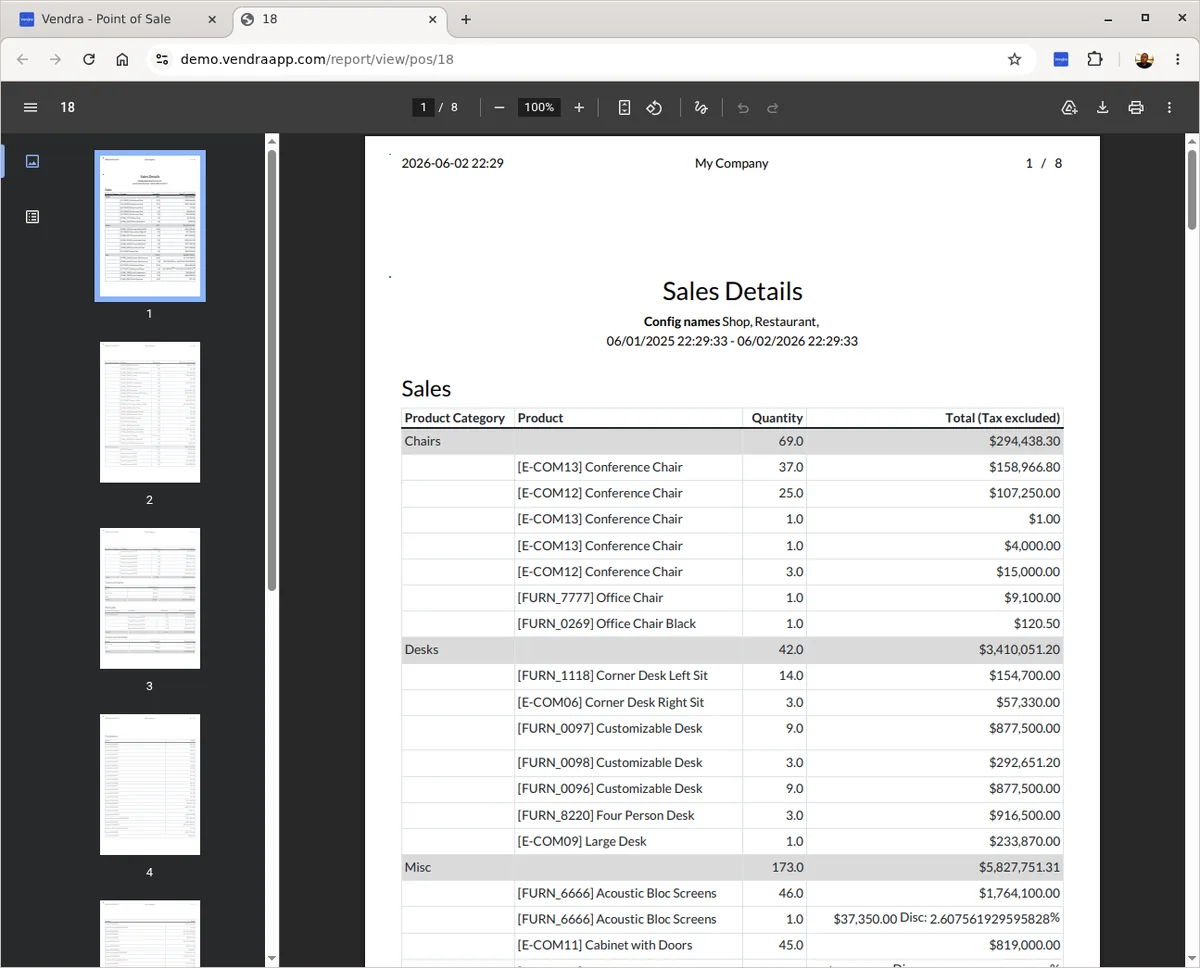
The management reports that matter for a retail business are: what sold, what didn't, who sold it, and what the margin was. Vendra's reporting module covers all of these:
- Sales by product, category and time period
- Cashier-level sales summaries (useful for performance reviews and commission calculations)
- Gross margin per product — surfacing which items are priced too thin
- Stock movement reports — showing fast-movers versus dead stock
- Daily sales summary available at session close
Multi-branch retail
If you run more than one outlet, managing stock separately per branch and consolidating reports manually is expensive in time and error-prone. Vendra's Business Plus plan supports multiple branches on the same system — each with its own POS configuration, stock, and reporting, but consolidated into a single management view.
Stock transfers between branches are tracked with the same level of detail as any other inventory movement. You know what left Branch A, what arrived at Branch B, and what the gap was — if any.
Getting started with Vendra for retail
Setup takes less than a day for a single-outlet shop. You import your product list (the system accepts CSV exports from most spreadsheet formats), configure your cashiers, connect your payment accounts, and you are live. No consultants, no installation process, no on-premise server.
The Entrepreneur plan at $28/month covers everything a single-outlet retailer needs: POS, full inventory management, purchasing, mobile payments and sales reporting. The Business plan at $59/month adds full double-entry accounting, payroll, CRM and intercompany stock transfers — ideal if you want to manage suppliers, run payroll and generate financial statements from the same system. For up to five outlets, Business Plus at $99/month unlocks every module with no restrictions.